Turn your Punk into a brick bust you can really build
Type your Punk number or drop its image. You get a 3D build animation, step-by-step instructions and your parts list, ready to order.
Nothing leaves your browser. Your number or image is used on your device only: no upload, no server, no AI.
Your bust
Built and checked in your browser
Drag to turn · pinch or scroll to zoom
More info
Instructions
One page per layer · flip through them here
Buy the bricks
You order and pay directly on LEGO or BrickLink. Nothing goes through this site.
or to buy everything there
Buy at LEGO in 3 steps
- ✓Your LEGO list is downloadedSaved to your Downloads
- 2Go to Pick a BrickLEGO’s own shop for single pieces. Uploading a list isn’t available in every country.Open Pick a Brick ↗
- 3Click “Upload List”, then choose your fileIt’s next to the search bar. LEGO adds every piece it has to your bag and lists any it couldn’t add: get those on BrickLink.

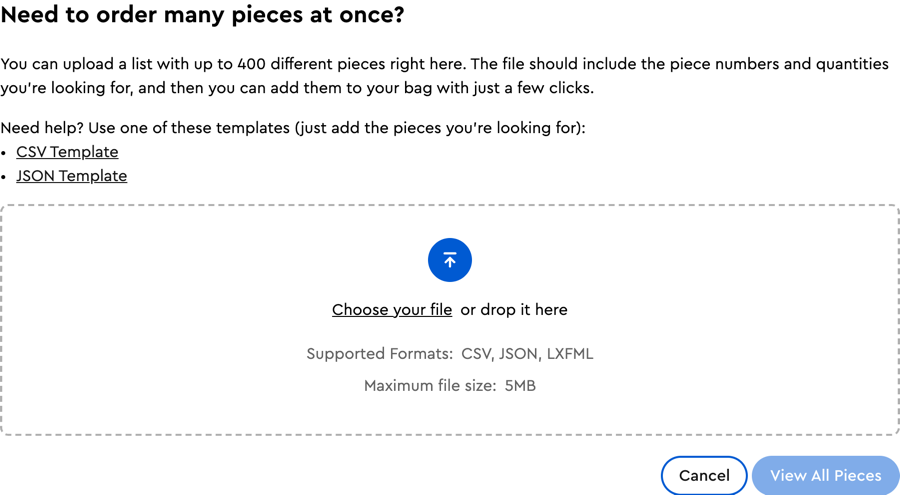
Screenshots of the Pick a Brick website, for guidance.
How ordering works
LEGO Pick a Brick is LEGO’s own shop for single pieces. “Buy at LEGO” downloads your list (). On Pick a Brick, click “Upload List”, choose the file, then check your bag: LEGO lists any piece it couldn’t add. Uploading a list isn’t available in every country: check Pick a Brick for yours.
BrickLink is a marketplace of independent shops selling single pieces, including the ones LEGO doesn’t sell or has out of stock. “Buy on BrickLink” copies your list. Sign in (with a LEGO account), open Want → Upload, choose “Upload BrickLink XML format”, paste, then open the new wanted list and use “Buy All” to find shops.
Files: · ·
Questions
Is my image uploaded anywhere?
No. Everything happens in your browser: reading the image, designing the model, the 3D view, the PDF and the video. There is no server and no AI behind this site, and nothing about your Punk is stored or sent.
Can I really build it?
Every model is checked by computer: all pieces are standard parts in real colours, every piece is attached to the base (0 floating), no two pieces overlap (0 collisions) and the centre of mass sits over the base. The site shows these checks for your model and says so plainly if one fails. Models have not been built with real bricks yet, so treat your first build as a test. A few colours can be hard to find in large plates.
How do I get the bricks?
Under “Order the bricks”: download the Pick a Brick file and upload it on LEGO Pick a Brick (“Upload List”), and/or download the BrickLink list and upload it on BrickLink (Want → Upload). The site tells you how many lots LEGO sells, and “Prefer parts available at LEGO” rebuilds your model with those parts only. You order and pay on those sites, never here.
What are the clear pieces?
Some Punks have details that touch nothing, like cigarette smoke. They are held up by small clear bricks, and the site tells you when it adds them.
Is this official?
No. Punk to Bricks is a free, open-source, unofficial fan project, not affiliated with, sponsored or endorsed by the LEGO Group, BrickLink or the CryptoPunks project. It sells nothing and earns nothing: no affiliate links, no commission, no tracking.